Apple TV: kiss your cable goodbye

apple-tv.jpg

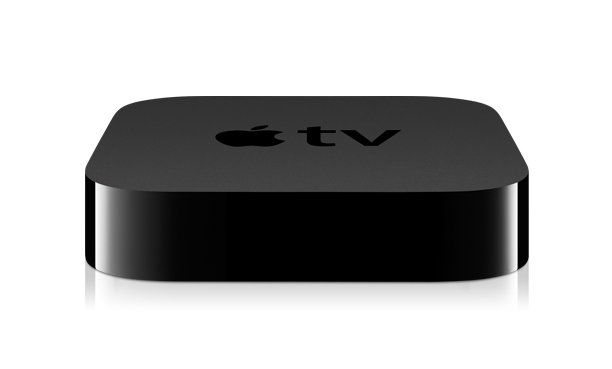
Cable companies like Time Warner and satellite companies like DirecTV are some of the most exploitive and hated companies in the country. Apple is one of the most loved companies. With the new Apple TV, Apple will give those nasty companies a rare new dose of competition.

I often ask people how much they pay for cable. Most of the time, I hear numbers like $90 a month or even more. Some people don’t know for sure how much they pay because they’ve bought bundles.

Last week, Apple announced that it will start shipping a new $99 Apple TV box later this month. I had been tempted to buy the older Apple TV for $229. Two things deterred me: the $229 cost (TV is not worth very much to me) and the fact that the old Apple TV box didn’t support Netflix. Isn’t it amazing how Apple knows what I want?

As far as I can tell so far, there are two major changes in Apple TV: 1. The new Apple TV does not have an internal hard disk. Instead, everything is stored on your computer and delivered to the Apple TV box over a Wifi network. 2. The New iTunes 10 includes “rental” of TV shows for 99 cents.

I’m fascinated that the new Apple TV box supports Netflix. Apple must have decided that Netflix is going to own the movie-streaming business, though Apple offers high-definition movies and Netflix does not. Is Apple planning to dominate the Internet delivery of TV shows the way Netflix dominates with movies?

I expect to see a lot of people cutting off their cable or satellite service and instead ordering the TV shows they want from Apple, à la carte. One’s movies would come from Netflix. As for the local stations, they’re totally useless except for their weather reports, and you can get that for free with a small antenna. In other words, higher quality, lower cost, with no money wasted on garbage you’re not interested in. You don’t have to have a Mac to do this. iTunes is available for Windows.

A postscript: I don’t have either cable or satellite TV at Acorn Abbey. The cost is too high, and most of the programming is useless. But I’d happily pay 99 cents for those things that I really want to see.

And a political angle: This is one of the reasons the big companies with near-monopolies on Internet service are so opposed to net neutrality. They want to be able to stifle this kind of competition from companies like Apple.

Keeping Facebook in quarantine

nyt-facebook.jpg

I was surprised at how many people were interested in my recent post on Defending your privacy on the Web. When I posted it, I was afraid that it might be too long and too technical and thus too boring. But in addition to the comments on the blog, I had a number of responses in private email. So I will continue to think about privacy issues and how to get around Big Brother’s spying eyes on the web.

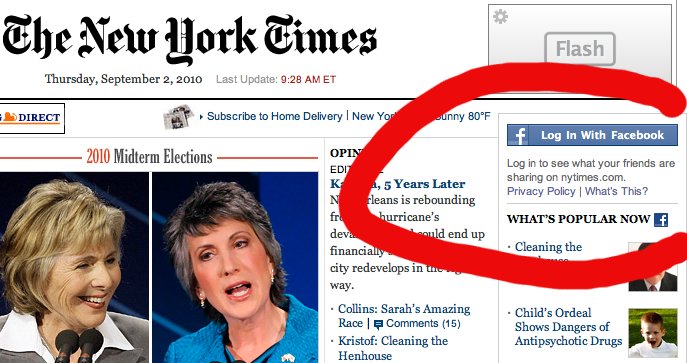
The Washington Post signed up to share data with Facebook several weeks ago. Now I’m appalled to see that the New York Times also is in cahoots with Facebook. Think how nice it is for advertisers if your Facebook data can be used at places like the New York Times to target you with advertising. Facebook knows your real name, who your friends are, what you like and dislike, etc. Targeting ads is not in itself offensive. The problem is having all this information falling into the hands of corporate America, which will use it to build dossiers, including your name, on individual Americans. These dossiers can be sold to whoever is interested — like potential employers, or the government.

How can you avoid this?

The first Facebook rule is this: Never, if you value your privacy, sign in with your Facebook ID to any sites other than Facebook.

Second, punish nosy, intrusive web sites such as the New York Times and the Washington Post by creating anonymous new logins. Here’s how.

1. Go to www.random.org and generate a random string for your sign-in ID, something like “RtAgr4MN”. Why a random string? It’s not necessary, but it’s a nice touch, and it gets you thinking about how randomness protects your privacy. Random data, by definition, contains no information at all.

2. Register at the site with your new sign-in ID, and give a fake (but workable) email address at www.mailinator.com. Your email name at mailinator.com can be the random string you generated in step 1 above. When the New York Times registration page asks you demographic questions about your age, etc., just make something up.

3. So that you won’t forget your new sign-in ID, edit the name of your bookmark to the site so that the bookmark name includes your sign-in ID.

4. For an extra level of anonymity, do Step 2 using Tor, the Onion Router. If you don’t yet know what Tor is, do some reading on the Tor web site. Tor is actually very easy to install and configure. Tor is much like a single-hop proxy server such as proxify.com, except that Tor uses multiple hops to hide your real IP address. Tor also is a free, open-source system. That is, corporations don’t own Tor.

I’m assuming that you’re already using the privacy steps I outlined in my previous post on privacy and that, when you sign in to a data-collecting site such as Facebook, you do so only in a separate browser. And of course it isn’t just Facebook we have to watch out for. It’s any of the sites whose revenue model is based on collecting, and reselling, personal data on its users. This includes Google and Yahoo, but the riskiest sites are the “social networking” sites such as Facebook and Twitter, which are clearly making a big push to get themselves enmeshed with popular web sites such as the New York Times.

As much as we might like Facebook, remember that it makes its money by collecting and selling information about you. As for Twitter, as far as I’m concerned it’s completely useless, and I have no idea why anyone goes there. But Twitter was developed, of course, to profit off snooping just as Facebook does.

Defending your privacy on the Web

1984-classes.jpg
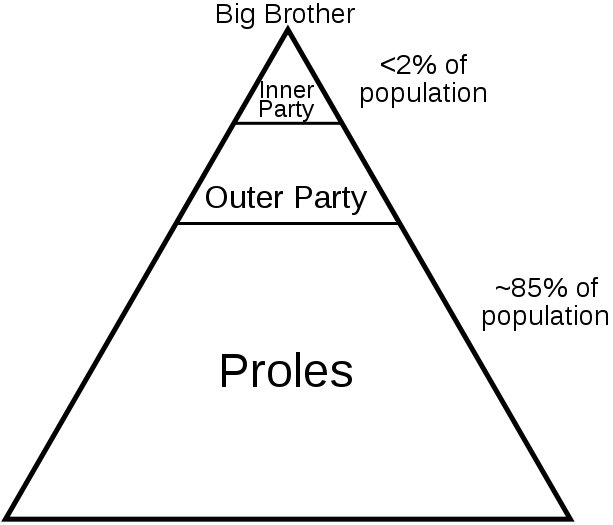
The social and political classes in George Orwell’s novel 1984

We’ve all been told that there is no such thing as privacy on the Web. That is true. Still, we are not helpless. Recently I got quite angry after I learned about a whole new category of privacy threat on the Internet — shady private organizations that collect data on you and then give it, or sell it, to the government. Glenn Greenwald posted an article on this a couple of weeks ago.

This motivated me to put a little time and research into figuring out how to attain a reasonable level of privacy on the Web with a reasonable effort. I was not interested in what I’d call a paranoid level of privacy. That would take a great deal of effort and would make it much harder, and less fun, to use the Internet. But surely, I thought, there is a reasonable level of defense that anyone could achieve with a little study and some changes in how you set things up on your computer.

There are three broad categories of privacy and security risk on the Internet:

1. Illegal activity. This would include password “phishing” scams, spyware, viruses that take over your computer and turn it into a “bot” under the control of spammers, etc.

2. Activity that is legal but extremely intrusive. This includes efforts to track you and identify you on the Internet, the better to target ads to you or to sell you something. This is extremely common, and it’s getting worse.

3. Tracking aimed at the ability to build dossiers on millions of Americans, names and all, that can be sold to the government or otherwise used against you. It was this type of activity that Greenwald (Greenwald is a Constitutional lawyer) was writing about in the link I posted above.

For category 1, your best defense is to keep your computer up to date with security fixes of the type that are regularly released by Microsoft and Apple.

For categories 2 and 3, there is much you can do to defend yourself by making some changes in how your configure your computer.

I’m going to list some steps that I took — and that you can take — with a brief description of the privacy threat and how the threat can be reduced. Please appreciate that I can’t answer questions about how to make these changes on your computer. Instead, you should do your own research and learn about how to manage these things. Then you’re on your way to empowering your own self defense.

1. Use two browsers. One of the ways that snoops can figure out your identity is to snitch your identity from sites that you sign into. I am particularly wary of Yahoo, Facebook, and Google. If you are signed into them, they know who you are. Clever tracking cookies can then identity you by name on other sites. For example, recently the Washington Post’s web page started displaying a new feature that shows (among other things) what you and your friends on Facebook have been reading on the Washington Post web site. The Washington Post was quick to put out a disclaimer about why this is no threat to your privacy. You decide. As far as I’m concerned, it’s yet another reason to ignore the Washington Post, which (to my judgment) is no longer a real newspaper but merely a mouthpiece for the Washington establishment.

So here’s what I did. I use a Macintosh, and my regular browser is Safari. I downloaded Google Chrome to use as a second browser. One browser is my “identity” browser, and the other is my “no-identity” browser. When I sign in to Facebook, I do that in the “identity” browser, Google Chrome. But I don’t go anywhere else in that browser. Someone could glean my identity from Facebook and track me all day, but they’d only discover that I didn’t go anywhere but Facebook.

I do the rest of my browsing in Safari. But when browsing in Safari, I never sign in anywhere. The other important step is to delete all your cookies. Now, cookies may do a couple of things for you that you like, like enable a web site to remember that you’ve been there before. But it’s actually pretty easy to browse happily without those minor conveniences that cookies can give. Mostly, cookies are there to support the business models of the web sites you visit, whether legitimate or snoopy. But I don’t care about anyone’s business model on the web. I care much more about my privacy. Delete your cookies frequently, even once a day. If you haven’t looked at your cookies in a while, you may be stunned to find that you have thousands of them. Cookies are being used more and more, and mostly they are being used against you.

2. Use a DNS other than your internet service provider’s DNS. I cannot explain here what DNS is or tell you how to change your computer’s DNS settings. You must do your own research and understand it well enough to make this change for yourself. My ISP is Verizon. But that doesn’t mean I have to use Verizon’s DNS. I use Google’s free, public DNS. Though I am increasingly suspicious of Google’s commitment to privacy, their written privacy policy for their public DNS does explicitly say that they won’t match your DNS lookups with other data that Google may have about you. They also say that they destroy their DNS logs on a regular basis. Based on what I know at this time, I’d rather have my DNS data logged at Google rather than Verizon. And besides, Google’s DNS service is better than Verizon’s. Here is a link to information on Google’s public DNS.

3. Get Adobe Flash under control. I’ve mentioned previously how Adobe Flash has become one of the most obnoxious players on the web. It’s for good reason that Apple’s Steve Jobs is doing battle with Adobe over Flash. Flash eats your bandwidth with unwanted fancy ads. It eats up your computer’s processing power, and, if you’re on a laptop or a handheld, will run down your battery quickly. Even worse, Adobe Flash operates totally outside of your browser’s security features. Flash’s default security settings are wide open. By default, Flash can set its own “Flash cookies,” which are much harder to find and delete because your browser doesn’t know about them. Flash permits web sites to store data on your computer. Flash even may permit some web sites to use your internet bandwidth for “peer assisted networks.” My guess is that, 10 years ago, Flash already had everything that is of interest to you as a web user. Their development effort, clearly, is focused on giving advertisers and the operators of web sites the tools they want to track users, gather data on users, and focus advertising on users. I don’t care about any company’s revenue. I care more about my privacy. So I took these steps:

a. Get a Flash blocker plug-in. For Safari, I use ClickToFlash. There are different Flash blockers for other browsers. Do some Googling for “flash blocker” plus the name of your browser, and you’ll find a way to keep Flash from running in your browser unless you explicitly give it permission.

b. Delete your Flash cookies. You may have hundreds or thousands of them. On the Macintosh, you can find them in the file system at ~/Library/Preferences/Macromedia/Flash Player/#SharedObjects. Drag them all to the trash. They are not benefiting you in any way. They are only benefiting someone’s revenue model. If you use a computer other than a Mac, Google for “flash cookies” or “flash shared objects” and see if you can’t find some instructions. Remember, I can’t help you with this. I’m only suggesting that it’s something you might want to research for yourself.

c. Change the default settings of Flash on your computer. To do this, you must go to Adobe’s web site. Lock it up as tight as possible. None of those features benefit you in any way. They all benefit those who want to track you or make money off you. I believe that Adobe intentionally makes it difficult to change the privacy and security settings in Flash. Adobe is one of the meanest players on the web today. They do not deserve our support.

4. Use a proxy service. Using a proxy service full time, at least in my judgment based on what we know at this time, is probably more trouble than it’s worth. Still, if I wanted to do something on the web that might be considered suspicious or that I think might attract attention (for example, visiting the WikiLeaks web site), then I would use a proxy service temporarily. Again, you must do your own research, but proxify.com is a good place to start.

Good luck and happy browsing. And please remember, I can’t answer questions or help you make these changes on your computer. I’d rather see you empowered to handle your own self-defense on the Internet. It’s a jungle.

Browser wars

Once upon a time, in the innocent early days of Web browsing, it was pop-up ads that drove us crazy. Browsers responded by including built-in pop-up blockers. That helped, for a while.

But advertising fiends are always going to find new ways of annoying us with ads we don’t want to see, trying to sell us stuff that we have absolutely no interest in. Pop-up blockers are unable to block pop-up ads created by embedding Javascript in the HTML. And for a truly annoying Web-browsing experience, there’s nothing quite so annoying as a Javascript pop-up containing a Flash ad. I call these ads “stomp-overs.”

What’s Flash? Adobe Flash is used by Web designers to create ads and web pages that are much fancier than what one can do in plain old HTML. For example, Flash ads may contain animations, or video. Flash ads also burn up your bandwidth while this unwanted video is downloaded, and they keep your computer’s processor busy rendering the Flash. Flash also consumes a good bit of your computer’s available memory.

Steve Jobs, the CEO of Apple, hates Flash and refused to support it on the iPad. Way to go! Jobs even took the unusual step of posting an essay on the Apple web site explaining his arguments against Flash.

Luckily, there are ways to block Flash. There’s Flashblock for the Firefox family and ClickToFlash for Apple’s Safari. For Internet Explorer, I believe it’s possible to disable Flash by changing some browser settings. I have not tested this in Internet Explorer.

Some advice to other Macintosh users: I have had more memory problems since upgrading to OS X 10.6.3 (Snow Leopard). The new Safari 5 also seems to be a bit of a memory hog. I’ve decided I’m going to have to add memory to my iMac to take it from 1GB to 4GB.

stompover-1.jpg
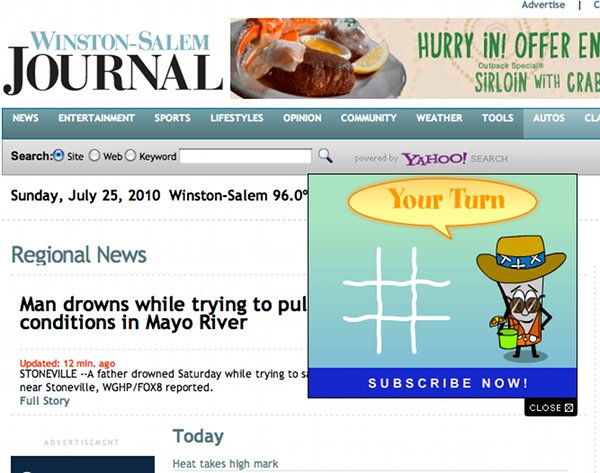
Stomp-over No. 1: This type of evil ad, common at Salon, throws up a Flash ad and grays out the rest of the page. You can’t proceed until you click the close box. In this example, the content of the Flash ad is being suppressed by Flashblock in the Google Chrome browser.

stompover-2.jpg
Stomp-over No. 2: This annoying little ad slides down onto the middle of the page. You have to find and click the close box to make it go away.

American cable and broadband: A ripoff

screen-shot-2010-07-20-at-52333-pm.png
A screen shot from the web site of Orange SA, a French telecom company

Periodically I check broadband costs in France, just to see how badly we have fallen behind in the United States. In France, you can get a package that includes Internet service, television, and telephone for 34.90 euros — about $45 — no contract required. For this money, you get up to 20 megabits download speed on your Internet connection, up to 100 television channels, and unlimited domestic and international calling on your telephone. Why is this?

Most Americans know very little about other countries and are conditioned to think that the United States is ahead of the rest of the world in technology. Nothing could be farther from the truth. In addition, Americans preach the virtues of competition, but we don’t practice what we preach. In France, rates are lower and service is better because of intense competition. In the United States, the rules are set by a Congress that is in the pockets of the big Telecom companies (not to mention the banks). Though the FCC is just now finally getting around to developing a national broadband policy, for the last 10 years nothing has happened except that the telecom corporations cooperated with government to exploit consumers and make the telecoms rich.

If Americans were better informed, I have no doubt that they’d be pretty angry. For 10 years they’ve been kicked around by the cable companies and telecoms. Everyone complains, but few realize that it didn’t have to be that way. Next time you hear someone use the words “business friendly,” ask them if that doesn’t translate to “friendly to the ripping off of the American population.”

By some odd irony, as I was researching French telecom costs this afternoon, my cell phone rang. It was Verizon, wondering why I haven’t “upgraded” my telephone. They want to give me a cheap new phone to get me to sign a two-year contract. Ha! I’ve never had a contract with Verizon, either on my cell phone or on my Internet service. These contracts are a major way that American telecoms prevent people from taking advantage of what little competition there is. I steadfastly refuse to sign a contract. And besides, why would I want a cheap, flashy phone when my three-year-old Motorola M800 works just fine. My Motorola phone is a serious phone with a serious antenna (hear that, iPhone?) that retailed for about $700, though I bought mine cheap on eBay. There’s no way I’d trade that phone for a new piece-of-junk phone (even if my Motorola M800 does weigh 10 pounds.)

Clearly Verizon is making a push right now to try to lure people into renewing their contracts. I’ve had several pieces of junk mail about that, and today there was the sales call. As the sales person gave me her pitch, I could hear a chorus of people in the background also making pitches. If Verizon is making a big push to lock people into contracts, what does that tell us?

It tells us that Verizon is expecting some kind of competition in the next two years that threatens to cut into their profits. Verizon has a gross profit margin of 60.18 percent. That’s predatory, and that’s what happens when corporations control a “business friendly” Congress and write their own regulations.

A candle in the wind, a whisper on the air

800px-candle.jpg
Wikipedia

I hope the non-nerds will excuse another nerd post. But because of some of the email I get, I know that some of the readers here are nerds…

As we contemplate the fact that we are all energy hogs (you do contemplate that fact, don’t you?), I think it’s interesting to remind ourselves just how much can be accomplished with small amounts of energy. Let’s use an example from radio. To us modern digital folks, radio may seem like old stuff, antique almost. But all of our favorite toys depend on radio, from iPhones to WiFi.

Musicians are familiar with the concept of the octave. Octaves have to do with the doubling of a frequency. A piano keyboard, for example, covers seven octaves of sound. The human ear can hear about 10 octaves of sound. We can apply the concept of the octave to any phenomenon where wave forms and frequency are involved. This includes, of course, electromagnetic energy. If you go up about 40 octaves from the piano keyboard, you arrive at the frequency of light. The human eye can perceive less than an octave of light. Red light is the lowest frequency of light we can perceive; violet is the highest.

In between the frequencies of sound and light is radio, in a frequency range of 3,000 cycles per second (3 kilohertz, or 3 kHz) to 300 billion cycles per second (300 gigahertz, or 300 GHz). That’s a lot of octaves. What’s amazing about radio is that different frequencies travel around the earth in very different ways. For example, the frequency of radio waves emitted by your cell phone (around 1 GHz), can’t travel very far, because it can’t (usually) bend with the earth’s curvature or bounce back down to earth off the earth’s ionosphere. On the other hand, radio frequencies up to about 30 megahertz (30 mHz) can travel all the way around the earth under the right conditions, even with very little energy.

A candle is better at producing heat, actually, than light. A candle produces a meager 13 lumens of light and 40 watts of heat! That’s a huge amount of heat energy. And, by the way, the average human body runs on about 100 watts of energy, of which the brain consumes a fifth — 20 watts. The brain burns less energy than a candle. And though the energy used by the human body is a tiny fraction of the energy used by our cars, our bodies are not excellent examples of energy frugality.

Compare the energy richness of the sun with the energy frugality of the moon. The sun’s radiation produces about 342 watts per square meter on the earth’s surface, on average, during the course of a year. By comparison, the energy on the earth’s surface from the moon (per square meter) is only about a thousandth of a watt. To generate 1 watt of electricity from moonlight would require about 3,200 square meters of solar panels. But we can still see the moon perfectly well, can’t we?

As I proved to myself today, a signal can travel from North Carolina to Switzerland using substantially less energy than the energy produced by a candle. Beacons I transmitted today using less than 2 watts of power were heard in Switzerland, the Netherlands, England, Italy, and, of course, California. One of the reasons this is possible is because I used a digital, computer-generated mode of data communication that is extremely slow, efficient, and noise resistant. This mode is called “WSPR,” pronounced “whisper.” It takes almost 2 minutes to transmit this much text in the beacon: “K9WQ EM86wk 30.” The first four characters, K9WQ, are my FCC call sign. “EM96wk” is shorthand for my approximate location. The “30” is the amount of power I used, represented as decibels, and equals less than 2 watts.

That seems like magic to me.

I wanted to calculate how many watts of energy are in the sound of a human being shouting. I don’t quite know how to do that calculation, but I’m sure that plenty of people can shout louder than 2 watts. That’s one of the reasons I don’t watch television. I’d rather whisper on the radio.

wprs-europe-1002-1.jpg
Who I heard, and who heard me

Recovered photos

a-recovered-photos-1.JPG
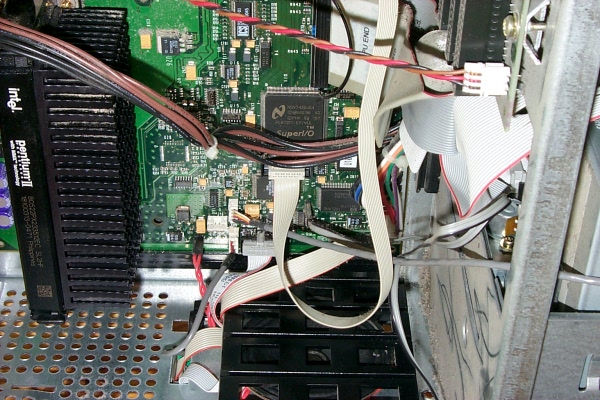
The motherboard of a 12-year-old computer: somewhere you don’t want to go

What if your computer crashed today and couldn’t be restarted? What would you lose? There is no costless way to back up your computer. Probably the easiest and least expensive plan is to periodically burn CDs or data DVDs of files you don’t want to lose.

Back in the late 1990s, when I was working for the San Francisco Examiner (may it rest in peace), I sent my older sister a quite fine computer that was being retired by the Examiner — a Hewlett Packard Kayak XA. The PC had been in the office of a former publisher of the Examiner, Lee Guittar, so the computer was executive-suite squeaky clean. My sister used this computer until about three years ago, when the computer was damaged by an ugly power failure in which the power went on and off several times in quick succession. The computer went to the garage, and my sister got an iMac.

A week or so ago, my sister brought the computer to me. I had promised to see if I could revive it. When powered on, the computer would emit a series of beeps and then go silent. I have the technical documentation for the computer, and I knew that the beep codes probably indicated a problem with the BIOS on the system board. But my attempts to reflash the BIOS using the procedure in the technical manual failed. If there was any hope for reviving the computer, a new mother board would be needed.

What would we do without eBay. There was a mother board for sale with exactly the right part number, for $20 plus $15 shipping. I bought it. After I installed the new mother board, the old PC booted with almost no further drama.

My sister had kept things well organized. Everything of interest was pretty much in three folders — “Pictures,” “Pictures 2”, and “Recipes.”

I’m trying to decide what to do with my refurbished HP Kayak XA mini-tower computer. It’s pretty slow by today’s standards. But I’ll at least keep it as relic of the San Francisco Examiner days. The computer still has an Examiner property tag on it.

Here is a sampling of the photos which were almost lost.

a-recovered-photos-2.JPG
San Francisco, looking across the bay from Point Bonita. My mother and sister used to make annual trips to San Francisco. Several of these photos were taken on those trips.

a-recovered-photos-3.JPG
Mendocino County, California, along Highway 1. In Ireland those rocks would be called skelligs.

a-recovered-photos-4.JPG
My sister’s deviled eggs, looking very Southern

a-recovered-photos-5.JPG
Loaves of bread made by my sister

a-recovered-photos-6.JPG
I believe this is some sort of apple pastry, made by my sister

a-recovered-photos-7.JPG
A pie, made by my sister

a-recovered-photos-8.JPG
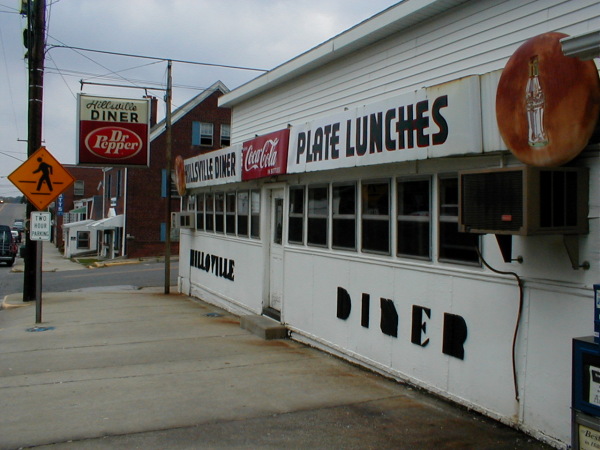
The Hillsville Diner, Hillsville, Virginia. It’s about 40 miles northwest of here.

a-recovered-photos-9.JPG
Inside the Hillsville diner

a-recovered-photos-10.JPG
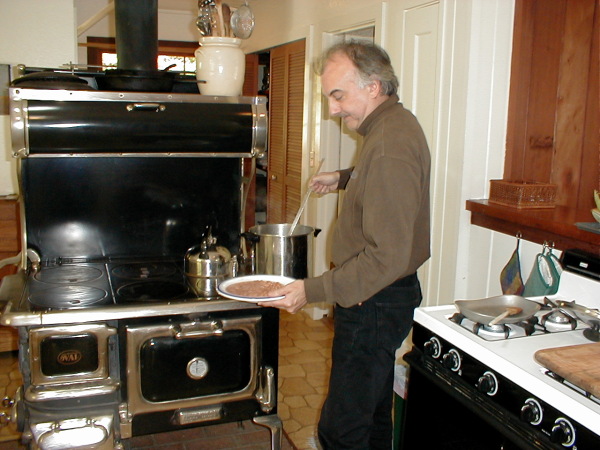
That’s me serving pinto beans from the wood cookstove. The stove is in a house that my sister and mother and I stayed in on a visit to Mendocino County. During the 1970s and 1980s, two of the old houses I lived in had wood cookstoves in them. I’m very skilled at cooking on a wood stove. Notice the gas stove behind me. We had ’em both going.

a-recovered-photos-12.JPG
That’s me, doing a very unprofessional job of cracking oysters in Inverness, California. The oysters came (of course) from the Hog Island Oyster Company on Tomales Bay. As for the oysters, we fried ’em in batter.

a-recovered-photos-13.JPG
A couple of times when my mother and sister came to San Francisco, we stayed at the Chicken Ranch cottage at Inverness, California, right beside Tomales Bay. In spite of its humble name, the Chicken Ranch cottage was at the time an outpost of Manka’s Lodge. This photo is taken from the backyard of the Chicken Ranch cottage.

a-recovered-photos-11.jpg
This is my sister and I, before the premiere of a Sharon Stone film in San Francisco. My boss at the San Francisco Examiner, Phil Bronstein, was married to Sharon Stone during that epoch, and so I got invitations like that. What an era: the thrill of the dot-com boom, grief for the end of the Examiner, and some Hollywood glamour thrown in.

Whole-house surge protector

s-surge-protector-2010-04-10-1.JPG

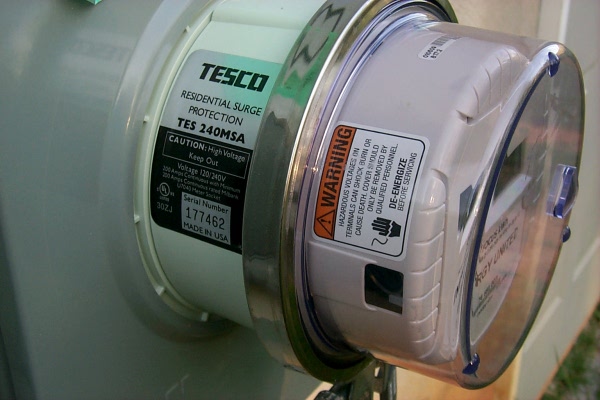
I finally have a whole-house surge protector, something I’ve wanted for a long time. It’s possible to buy these things and have an electrician install it, but my electric company offers them for $9.95 a month, with installation, and a warranty, included.

The surge protector installs under the meter. It took the technician only a couple of minutes to install it. The warranty will pay for the repair or replacement of anything damaged by lightning (or any kind of power surge) that gets through this surge protector. The warranty covers each damaged device for up to $5,000, or a total of up to $50,000 per incident. One of the advantages of a whole-house surge protector is that it can protect the big stuff such as the heat pump, refrigerator, washing machine, etc. It’s a good idea to keep the small surge protector installed at computers, etc., to give them double protection.

I hope this makes me feel a little more secure during the summer lightning storms. I know how much damage lightning can do…

Radio in the age of Twitter?

d-whisper-2.JPG
The map shows the locations of the stations whose beacons I heard (or who heard mine) Friday afternoon.

National Public Radio had a story this week on how ham radio is growing in the age of Twitter. Not only is ham radio very much alive, hams are always figuring out new things to do with radio and computers.

I recently discovered a new digital communications mode invented by hams called WSPR — Weak Signal Propagation Reporter. The idea is to have a computer-controlled radio listen for (and transmit) low-power digital beacons on certain frequencies. The power could be as low as 1 watt. But because the data carried on this signal is intentionally transmitted at such a slow speed, the signal is very reliable, even a weak signal in the presence of noise. It takes almost two minutes to transmit only enough data to give the identity of the transmitting station, its location, and the amount of power used. Error correction is used to make copying the signal more reliable. So a tiny amount of power goes a long way.

The computer completely automates the process, listening and periodically transmitting. Every two minutes, it tells you whose beacons you heard. The computer also uploads this list of who it heard to a web site where all the data is collected. On this web site, you can see a map that shows who can hear whom all over the world.

Modern ham radios, by the way, have interfaces that allow them to be controlled by computers. Computer programs also can create audio to send to the transmitter, and interpret audio from the receiver. This is how computers encode and deocode digital signals that are transmitted as sound on the radio.

Using 3 watts of power, my beacon was heard from New England to California. I raised the power to 30 watts for only two beacon transmissions, and I was heard across the Atlantic, by DK3SML in Germany; G8BKE in England; IV3DXW in Italy; PA3MET in the Netherlands; and 4X1RF in Israel. This was on a frequency of 10.140 Mhz.

Some hams like to work with big antennas on tall towers, and power amplifiers. I find it more challenging (not to mention less expensive) to limit myself to 100 watts and only such antennas as I can hide in my attic. California on 3 watts and Israel on 30 watts — not bad.

Part of what’s fascinating about WSPR mode is that it’s an easy way to test your radio, your antenna, and radio propagation conditions. Leave the computer and radio alone for an hour or two to transmit and receive beacons, then have a look at the list of who heard whom. It answers the question “How far can my signal be heard?”

d-whisper-1.JPG
The program which controls sending and receiving low-power beacons

The methods of 100 years ago

henleys-title-page.jpg

Here is a link to a scanned copy of Henley’s Twentieth Century Formulas, Recipes and Processes. The book, which is in PDF format, is more than 800 pages long and covers just about everything a self-sufficient American in 1914 might need to know — farming, shelter, tools, homemade cosmetics and medicines, preserving food, and so on. The PDF file is more than 100 megabytes. Everything is arranged in alphabetical order.